Tuesday, March 14, 2023
How to raise a TAC with Check Point Software
Here is the link to raise a service request (SR) with Check Point technical assistance center.
https://help.checkpoint.com/
It will open a page where you can click on "Create New SR".
After clicking it will bring you to a selection.
Select the Technical Product Issue, and it will allow you to enter your product/asset id you need to raise a ticket on.
Just enter your asset id such as the serial number which can be found on the System Overview on GAIA or on clish -c "show asset all" and it will automatically provide the equipment details. Next step is to provide the case details.
Thats it.
Tuesday, January 21, 2014
Netflow on ASR9000v
!========== verify PIE ==========
show install active
!========== configure satellite fabric links ==========
vrf asr9kv
address-family ipv4 unicast
interface loopback xyz
description Loopback for ASR 9000v unnumbered fabric links
vrf asr9kv
ipv4 address 10.0.0.1 255.0.0.0
nv
satellite 101
type asr9000v
description my satellite
ipv4 address 10.0.0.101 255.0.0.0
interface TenGigabitEthernet 0/x/y/z1
bundle id 101 mode on
interface TenGigabitEthernet 0/x/y/z2
bundle id 101 mode on
interface Bundle-Ethernet 101
vrf asr9kv
ipv4 point-to-point
ipv4 unnumbered loopback xyz
nv
satellite-fabric-link satellite 1001
remote-ports GigabitEthernet all
!========== power up satellite ==========
! When satellite is initially connected to ASR9K host, satellite image version could be auto
! discovered. “show nv satellite status” can show if the satellite image is the latest version
show nv satellite status
! If image is not compatible we can push the image from the host to the satellite
show nv satellite status satellite 101
! Iniate transfer if needed
install nv satellite 101 transfer
! Verify the status
show nv satellite status satellite 101
! Optional verification of discovery
show nv satellite protocol discovery brief
show nv satellite protocol discovery interface TenGigE 0/1/0/0
! Show inventory (admin context)
show inventory
show inventory rack
! Debug
Show interface GigE 100/0/0/0
Show nv satellite hardware satellite 100
!========== configure satellite host ports ==========
interface GigabitEthernet 101/0/0/1 !<--- ASR9K starts at port 1 / Satellite starts at port 0
ipv4 address 62.1.0.1/ 24 !<--- test assigned IP and ping
!========== configure netflow ==========
flow exporter-map flow-exp-map1
version v9
options interface-table timeout 600
options sampler-table timeout 600
template data timeout 600
template options timeout 600
!
dscp 16
transport udp 5000
source Loopback0
destination 124.106.4.126
!
flow monitor-map flow-mmap-ipv4
record ipv4 peer-as
exporter flow-exp-map1
cache entries 250000
cache timeout active 600
!
sampler-map flow-sampler-1-in-5k
random 1 out-of 5000
!
!========== apply netflow to satellite ==========
interface GigabitEthernet 101/0/0/1
flow ipv4 monitor flow-mmap-ipv4 sampler flow-sampler-1-in-5k ingress
! Verify Netflow
show flow monitor flow-mmap-ipv4 cache internal location 0/Z/CPU0
! Punted traffic
show controllers np counters all
! View cache
sh flow monitor flow-mmap-ipv4 cache format table include layer4 tcp-flags ipv4 sour dest prot tos count pack byte location 0/0/CPU0
! Check exporter
show flow exporter flow-exp-map1 location 0/0/CPU0
! Check sampler
show sampler-map flow-sampler-1-in-5k
! Interface Counters
show interface <intf name> accounting rate
! Policer on NPU
sh flow platform nfea policer np 0 location 0/0/cPU0
show install active
!========== configure satellite fabric links ==========
vrf asr9kv
address-family ipv4 unicast
interface loopback xyz
description Loopback for ASR 9000v unnumbered fabric links
vrf asr9kv
ipv4 address 10.0.0.1 255.0.0.0
nv
satellite 101
type asr9000v
description my satellite
ipv4 address 10.0.0.101 255.0.0.0
interface TenGigabitEthernet 0/x/y/z1
bundle id 101 mode on
interface TenGigabitEthernet 0/x/y/z2
bundle id 101 mode on
interface Bundle-Ethernet 101
vrf asr9kv
ipv4 point-to-point
ipv4 unnumbered loopback xyz
nv
satellite-fabric-link satellite 1001
remote-ports GigabitEthernet all
!========== power up satellite ==========
! When satellite is initially connected to ASR9K host, satellite image version could be auto
! discovered. “show nv satellite status” can show if the satellite image is the latest version
show nv satellite status
! If image is not compatible we can push the image from the host to the satellite
show nv satellite status satellite 101
! Iniate transfer if needed
install nv satellite 101 transfer
! Verify the status
show nv satellite status satellite 101
! Optional verification of discovery
show nv satellite protocol discovery brief
show nv satellite protocol discovery interface TenGigE 0/1/0/0
! Show inventory (admin context)
show inventory
show inventory rack
! Debug
Show interface GigE 100/0/0/0
Show nv satellite hardware satellite 100
!========== configure satellite host ports ==========
interface GigabitEthernet 101/0/0/1 !<--- ASR9K starts at port 1 / Satellite starts at port 0
ipv4 address 62.1.0.1/ 24 !<--- test assigned IP and ping
!========== configure netflow ==========
flow exporter-map flow-exp-map1
version v9
options interface-table timeout 600
options sampler-table timeout 600
template data timeout 600
template options timeout 600
!
dscp 16
transport udp 5000
source Loopback0
destination 124.106.4.126
!
flow monitor-map flow-mmap-ipv4
record ipv4 peer-as
exporter flow-exp-map1
cache entries 250000
cache timeout active 600
!
sampler-map flow-sampler-1-in-5k
random 1 out-of 5000
!
!========== apply netflow to satellite ==========
interface GigabitEthernet 101/0/0/1
flow ipv4 monitor flow-mmap-ipv4 sampler flow-sampler-1-in-5k ingress
! Verify Netflow
show flow monitor flow-mmap-ipv4 cache internal location 0/Z/CPU0
! Punted traffic
show controllers np counters all
! View cache
sh flow monitor flow-mmap-ipv4 cache format table include layer4 tcp-flags ipv4 sour dest prot tos count pack byte location 0/0/CPU0
! Check exporter
show flow exporter flow-exp-map1 location 0/0/CPU0
! Check sampler
show sampler-map flow-sampler-1-in-5k
! Interface Counters
show interface <intf name> accounting rate
! Policer on NPU
sh flow platform nfea policer np 0 location 0/0/cPU0
Saturday, August 18, 2012
The Cisco ISG – PTA
The Cisco ISG – PTA
When we implement PPPoE using a
multi-VRF setup it appears that the COA client needs to be on the same VRF as
the client it is referencing by the SSG-Account-Info, usually this is the
clients IP address.
Diagram 1.
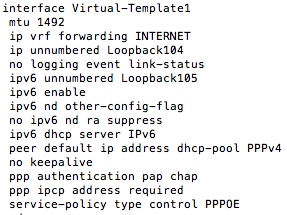
Virtual-Template Configuration:
The loopback and virtual-template interfaces are on the
INTERNET VRF.
COA Server Configuration:
Now when I try to send a COA request to activate a service:
You can see that we are getting a COA Nack.
The way to resolve this is to enable the NAS to send the VSA
on the accounting requests and use the “parent-session-id” as your reference.
With the above we can see that the service has been
activated.
Tuesday, September 13, 2011
Cisco Gigabit Ethernet Transceiver Modules Compatibility Matrix
If you need to verify whether your Gigabit Ethernet transceivers (SFP) is compatible with your Cisco device, please follow this link.
Sunday, August 28, 2011
How to configure MacBook Bluetooth DUN with BlackBerry 9700
For Globe Telecom Post-Paid accounts, here are the configurations needed:
Telephone number: *99#
Username: globe
Password: globe
APN: internet.globe.com.ph
Now you need to install the Black Desktop Manager at this site so the Research In Motion (RIM) drivers will be installed. This will be needed when you configure DUN because you will be selecting the device type.
Telephone number: *99#
Username: globe
Password: globe
APN: internet.globe.com.ph
Now you need to install the Black Desktop Manager at this site so the Research In Motion (RIM) drivers will be installed. This will be needed when you configure DUN because you will be selecting the device type.
![]() |
| Rim Drivers Installed |
Saturday, April 23, 2011
Subscribe to:
Posts (Atom)